Pay the bill
Who can use this: access pos. Cheque / voucher methods need their own permissions when those modules are on. Where to find it: Sales > POS (payment buttons on the bill)
What is this?
Finish the sale: take money (or credit), save the invoice, print the receipt. This matches a full POS “how to sell / take payment” chapter.
When to use which button
| Button | Use when |
|---|---|
| CASH | Customer pays with cash (F6). |
| CARD | Card machine / card payment details. |
| CREDIT | Pay later — customer account due. |
| MULTIPLE | Split across cash + card (or more rows). |
| HOLD BILL | Pause — not a finished payment. See Hold bill. |
Before you start
- At least one product is on the bill.
- For CREDIT, pick a customer first.
- Confirm the total with the customer.
Steps
-
Check the total.
-
Click CASH for drawer cash (F6).
-
Type amount given (F7 focuses that box).
-
Or click CARD and fill Card Payment Details.
-
Or click MULTIPLE — window title Add Payment — use Paid On, + Add Payment Row, Payment Note as needed.
-
Or click CREDIT to sell on account.
-
Click Finalize Payment when the amount is right.
-
Click Close if you must leave without paying.
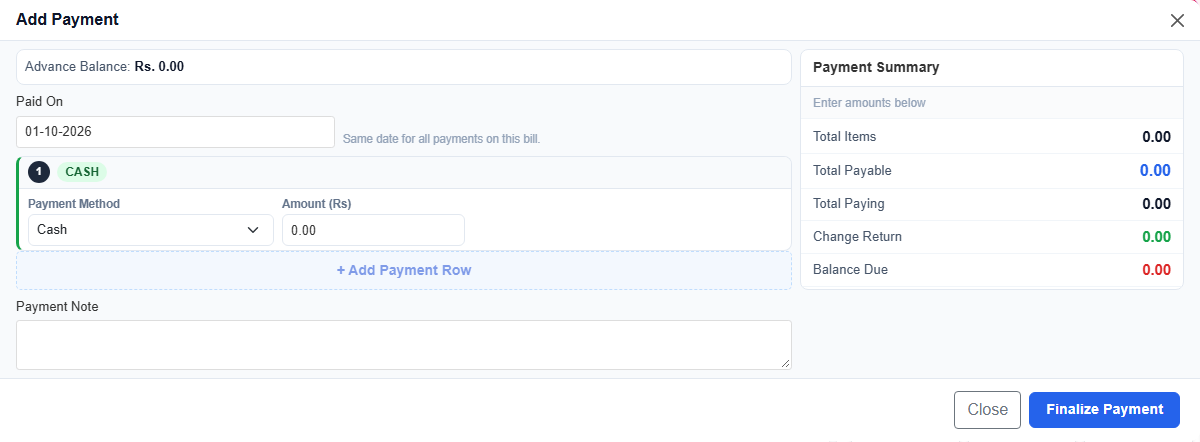
Field guide
| Field | Required? | What to enter |
|---|---|---|
| CASH amount | For cash | Money received from customer. |
| Card number | For card | What the form asks for. |
| Card holder name | No | Name on the card. |
| MULTIPLE rows | For split pay | Each method + amount. |
| CREDIT | For due bill | Customer with enough limit. |
| Payment Note | No | Short note on the payment. |
Examples
Cash with change — total 850 → customer gives 1000 → enter 1000 → return change → finalize.
Split pay — MULTIPLE → cash 500 + card rest → finalize.
Credit — select customer → CREDIT → finalize → due shows on ledger.
What you will see
- Bill closes after success
- Invoice appears under Sales > All Sales
- Stock reduces for sold items
Tips
- Count change before handing the receipt.
- Reprint from All Sales > Print Invoice if paper jams.
- Cheque / voucher appear only when those modules and permissions are on.
Common problems
| Problem | Solution |
|---|---|
| CREDIT refused | Pick customer, or limit / overdue block. |
| Card form will not close | Fill required card fields. |
| No receipt | Check printer; reprint from All Sales. |