Extend valid date
Who can use this: view cheque-management
Where to find it: Cheque Module → Cheques Received / list → Extend valid date
What is this?
Records that the customer asked to move the Cheque Valid Date forward (presentation / due tracking).
It does not clear, deposit, or change the ledger by itself.
Before you start
- Cheque status is Pending or Deposited
- You know the new date the customer requested
- Reason text ready (min length enforced)
Steps
- Open the cheque list (Cheques Received most often).
- Select the cheque (group shares the same number + party).
- Press Extend valid date.
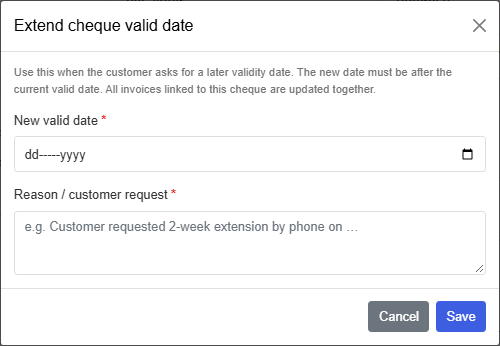
- Modal Extend cheque valid date:
- New valid date — must be after the current valid date
- Reason / customer request — required
- Press Save.
All payment rows in that cheque group get the new cheque_valid_date.
History is kept in valid-date extensions (for audit).
When to use
| Situation | Action |
|---|---|
| Customer: “Please deposit next week” | Extend valid date, then Deposit later |
| Bank date changed by agreement | Extend, keep Pending / Deposited |
| Cheque already Cleared / Bounced / Cancelled | Cannot extend — status must be open |
Tips
- Overview “due window” (7 / 15 / 30 days) uses valid / due tracking — extending changes what looks overdue.
- Still follow bank rules; this is shop tracking, not a bank instruction.
Common problems
| Problem | Solution |
|---|---|
| Save rejected | New date must be later; reason too short |
| Button missing | Wrong status — only Pending / Deposited |
| Only one invoice updated | Same cheque number group should update together — re-check selection |