Set up
Who can use this: edit b2b-settings (turn feature on) and role permissions under wholesale order management. Where to find it: Settings > General Settings > Features
What is this?
One-time setup before staff use Quotation → Confirm qty → CREDIT allocate.
Before you start
Decide which roles may create quotations, confirm qty, and allocate delivery. Leave the feature off if this shop only does retail counter sales.
Steps
- Open Settings > General Settings.
- Open Features.
- Find Wholesale order chain.
- Turn it On. It saves by itself.
- Optional: set MOQ on quotation / confirm qty to Warn only or Block save.
- Open Users > roles and tick what staff need:
- view b2b-sales-order
- create b2b-sales-order
- edit b2b-sales-order
- allocate b2b-delivery (needed for CREDIT allocate)
- Refresh the browser.
- Check Sales > Wholesale history appears.
- Open POS and confirm the quick bar shows Quotation / Confirm qty / Open order.
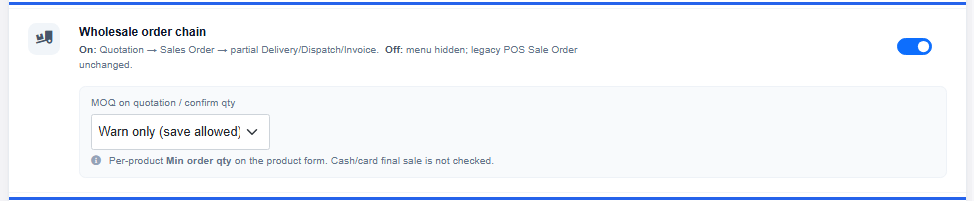
What you will see
Feature text: On: Quotation → Sales Order → partial Delivery/Dispatch/Invoice. Off: menu hidden; legacy POS Sale Order unchanged.
Tips
- Per-product Min order qty on the product form drives MOQ warnings.
- Cash / card final retail sale is not blocked by MOQ.
- Train one store manager on the full CREDIT allocate path before all cashiers.
Common problems
| Problem | Solution |
|---|---|
| Feature row missing | Role needs edit b2b-settings. |
| Wholesale history missing after On | Hard refresh. Check view b2b-sales-order. |
| CREDIT says no permission | Tick allocate b2b-delivery on the role. |