Pay customer due (POS FIFO)
Who can use this: Role with bulk sale payment
Where to find it: POS → $ button (Pay customer due) when a registered customer is selected
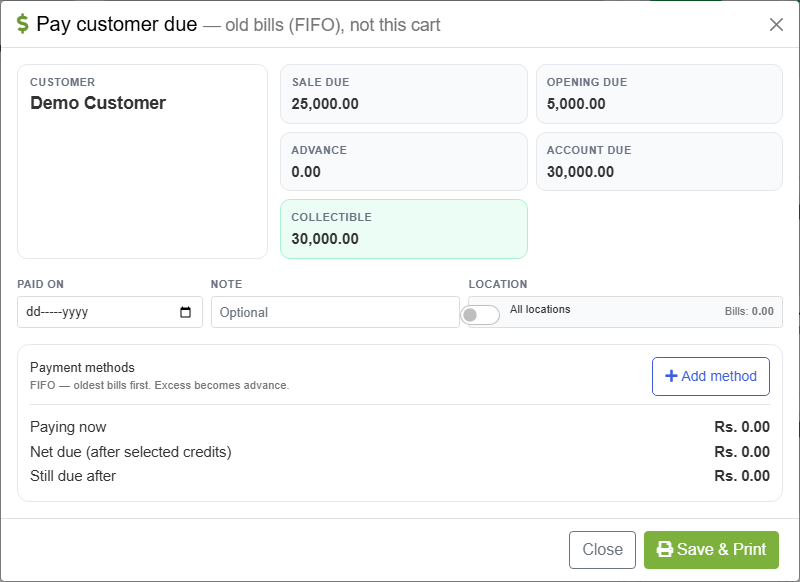
Modal title: Pay customer due — old bills (FIFO), not this cart
What is this?
Fast counter collection: the customer pays money now, and BillShop clears dues in this order:
1) Opening balance (when due)
2) Oldest unpaid sale invoices first (FIFO)
3) Leftover money → customer advance
This does not pay the bill currently open in the cart. Finish or hold the cart separately.
Before you start
- Select a registered customer on POS (not Walk-In)
- Customer has sale due and / or opening due (and optionally advance / returns)
- Permission bulk sale payment
Steps
- On POS, select the customer.
- Click the $ control (Pay customer due).
- Read the stats:
| Stat | Meaning |
|---|---|
| Sale due | Open invoices |
| Opening due | Opening balance left |
| Advance | Credit already on account |
| Account due | Ledger due |
| Collectible | What you can collect now |
- Set Paid on and optional Note.
- Location — leave current, or turn All locations if dues span shops.
- Optional credits:
- Tick Apply existing advance … to oldest due bills (FIFO)
- Under Return credit, select return(s) to apply FIFO to oldest dues
- Under Payment methods:
- Enter amounts per method
- Add method for cash + card + cheque, etc.
- Hint on screen: FIFO — oldest bills first. Excess becomes advance.
- Check Paying now, applied credits, and Still due after.
- Press Save & Print → confirm Yes — Save & Print.
- Use Reprint last / Recent payments if you need the receipt again.
FIFO rules (how money is applied)
For each payment method, in the order you added them:
- Opening balance remaining (when part of collectible)
- Outstanding sales oldest first
- Anything left on that method → advance
Return credit and existing advance (when ticked) are reserved before cash FIFO so the same bill is not double-covered.
When to use POS FIFO vs Sales Payments
| Situation | Use |
|---|---|
| “Take Rs. 20,000 against old bills” | Pay customer due (this page) |
| “Clear invoice A and C only” | Sales payments |
| Opening + bills in office with named bills | Sales payments → Both + allocate |
| Supplier payment | Purchase payments |
Tips
- Multi-method is supported — each method runs its own FIFO slice.
- Excess over collectible becomes advance (useful for deposits).
- Cheque bounce may show Recover + link to Cheque Mgmt.
- EMI collection can reuse this FIFO pipeline when Installment module is on.
Common problems
| Problem | Solution |
|---|---|
| Button / modal missing | Need registered customer + bulk sale payment |
| Walk-In blocked | Switch to a real customer |
| Nothing collectible | No open sale / opening due |
| Thought it paid the cart | It never pays the open cart — pay the cart separately |